Garmin Drive™
- 3.9
- Rating
- 1.00M
- Installs
- Free
- Price
 Analysis by App-foxy
Garmin Drive™ is the kind of Auto & Vehicles app I would suggest to someone who already owns compatible Garmin driving equipment and wants a simpler way to manage a journey. Its central value is not trying to replace every tool on your phone. Instead, it works as a companion for a Garmin-based driving setup, helping turn the trip from a collection of separate tasks into one more connected routine. I found that distinction important because it explains both its usefulness and its limits.
Developed by Garmin, this free app is available for everyone and has built a sizeable audience, with over a million installs and a 4.0 average from around twenty-three thousand ratings. It is currently listed as version 4.28.05 and requires Android 9 or later. Those details make it easy to approach as a mainstream companion app rather than a specialist utility, but the real question is whether it fits the way you drive.
What Garmin Drive actually adds to a Garmin setup
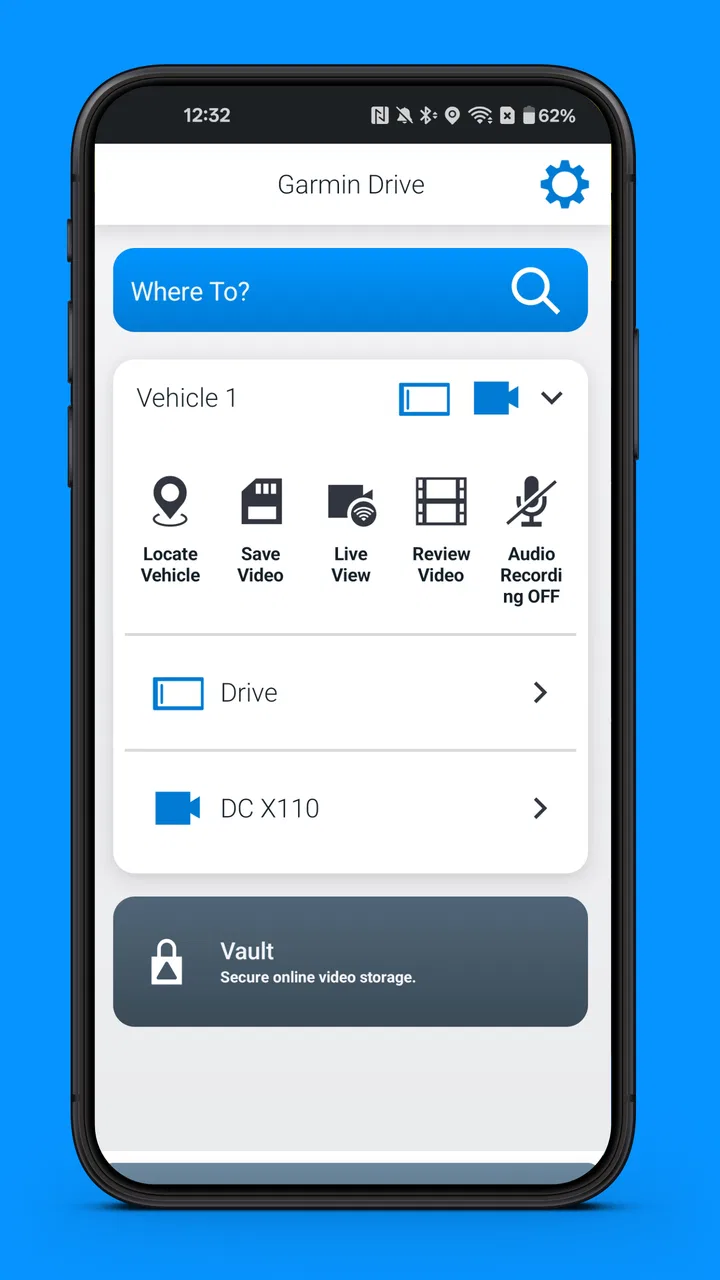
The most important capability is its role as a connected driving companion. In practice, that means the app is most valuable when your phone and compatible Garmin devices are used together. I would not judge it like a standalone map app, because that creates the wrong expectations. Its purpose is to support the driving experience around Garmin hardware rather than make your phone the only screen in the car.
You May Also Like

 Blood Strike: 2.5 Anniversary
Blood Strike’s Loadouts Turn Every Drop Into a Tactical Gamble
A close look at Blood Strike’s custom loadouts: how fast access to signature weapons reshapes its battle royale rhythm, rewards preparation, and narrows the gap between fights.

 Pandora - Music & Podcasts
Pandora’s Music Is Easy to Start, but Harder to Recover
Pandora’s strength is its low-effort path from a seed to a station. Its weak spot is how much confidence it asks you to place in connection, setup, and quiet recovery.

 8 Ball Pool
 Is Built on Rivalries, Rematches, and Routine
A close look at the rivalries, rematches, shared routines, and unanswered safety questions that turn a quick pool match into a persistent mobile community.

 Samsung Music
’s Quiet Strength Is Playing What You Already Own
Its reach comes less from spectacle than from dependable access to a personal library. That simplicity is both the app’s strongest retention engine and its ceiling.

 AccuWeather: Weather Radar
AccuWeather Review: A Quick, Clear Forecast for Everyday Decisions
For everyday plans, the best forecast is the one you can understand quickly. AccuWeather makes rain timing, radar, and local conditions easy to act on, with a few trade-offs.

 Hill Climb Racing
Why Hill Climb Racing Still Turns Crashes Into One More Run
A tiny car, a bumpy hill and one more upgrade: Hill Climb Racing keeps resurfacing because its simple chaos makes every near-miss feel personal.
More From Our News Desk
View All News


That approach can make a noticeable difference for drivers who prefer a dedicated navigation display. A phone is convenient, but using it for navigation often means balancing the map with calls, messages, battery concerns and other notifications. A Garmin device can remain focused on the road while the companion app handles supporting tasks on the phone. The result feels more deliberate than simply mounting a phone and opening a general navigation service.
The benefit is especially clear when you use the same vehicle regularly. After the initial setup, the app becomes part of a routine: connect the phone, check that the Garmin equipment is available, and start the drive. That is less exciting than a flashy new feature, but it is exactly the kind of small reduction in friction that matters when you are leaving for work or trying to get moving in an unfamiliar area.
I also like that the app sits in the Auto & Vehicles category rather than presenting itself as a social or entertainment product. Its focus is practical. You open it because you are preparing to drive, checking a route-related detail or keeping the Garmin side of your setup organized. That narrow purpose helps it avoid becoming another application that demands attention while you are already busy.
The capability matters most when the phone is not the whole navigation system
If your only goal is to get turn-by-turn directions on a phone, a familiar mapping app may be more convenient. Those services are usually ready to use immediately and do not depend on a separate Garmin device. Garmin Drive becomes more compelling when you deliberately want the phone and Garmin hardware to share the job.
That is the first trade-off I would explain to a friend: the app is a companion, not a universal replacement for every navigation option. Once you understand that, its design makes more sense. It is not trying to win by offering the broadest possible collection of phone-first features. It is trying to make a Garmin-centered driving workflow easier to live with.
How it feels during an ordinary drive
My preferred way to use an app like this is to prepare before pulling away. I would open Garmin Drive while parked, make sure the phone is connected to the relevant Garmin equipment, and confirm that everything is ready before entering traffic. That simple habit avoids one of the most common frustrations with connected car apps: discovering a connection problem only after the journey has started.
On a normal weekday, the practical advantage is continuity. I can leave the phone in its supporting role instead of repeatedly touching it to change screens. The Garmin display remains the place I look for navigation, while the phone provides the connection behind the scenes. This separation is more comfortable for me than switching between a map, a call and other phone activity on one small screen.
There is also a useful psychological effect. When the app is set up correctly, I spend less time thinking about which device should do what. The dedicated Garmin unit handles the driving view, and the mobile application supports the broader system. That division is easy to overlook, but it can make the setup feel calmer, particularly on longer drives where constant phone interaction becomes tiring.
Still, the experience depends on the relationship between the phone, the app and compatible Garmin hardware. If one part is unavailable, the value drops sharply. I would not install it expecting the same experience as a fully independent navigation app. Before relying on it for an important trip, I would test the complete setup close to home and learn how the connection behaves when the car starts, the phone locks or another device is already paired.
A small preparation routine saves more trouble than constant troubleshooting
One practical tip is to treat the app as part of a pre-drive checklist rather than something to repair while moving. Open it before starting, verify the Garmin device is recognized, and keep the phone where it can maintain a stable connection without becoming a distraction. This is not glamorous advice, but it is more useful than assuming the app will solve every connection issue automatically.
Another helpful habit is to decide in advance which device is your primary screen. If you keep glancing at both the phone and Garmin display, the connected setup loses much of its purpose. I get the best result when I use the dedicated Garmin screen for navigation and leave the phone alone except when parked. That makes the app feel like background support rather than another source of visual clutter.
I would also test the arrangement with the car you actually drive. A setup that works smoothly in one vehicle may feel less convenient in another because of phone placement, dashboard visibility or how quickly devices reconnect. The app itself cannot remove those physical differences. A few short local trips are enough to reveal whether the workflow feels natural before you depend on it for a long journey.
The situation where it makes the biggest difference
The strongest everyday scenario is a driver who uses a Garmin navigation device for commuting but still wants the phone involved in the wider driving workflow. Imagine leaving for work on a rainy morning. Instead of mounting the phone as the main map and juggling it with notifications, you start the car, let the Garmin equipment take the central navigation role, and use Garmin Drive as the bridge between the phone and that dedicated display.
That arrangement is not necessarily faster than opening a map app. Its advantage is consistency. You have a predictable place for navigation and a predictable preparation routine. On a familiar commute, that may only save a little effort, but over time those small reductions make the driving setup less annoying. On an unfamiliar route, the benefit is greater because you are less tempted to handle the phone while also trying to follow directions.
It can also suit households where a Garmin device is shared between drivers. The app gives each person a reason to keep the mobile side of the setup ready on their own phone, rather than relying entirely on whichever phone happened to be paired last. I would still test the switching process before an important trip, but the companion approach is more flexible than treating the Garmin unit as an isolated object.
For a road trip, I see the main value in reducing device juggling. Long journeys often involve charging a phone, receiving calls and checking route progress. A dedicated Garmin screen can keep navigation visible while the phone remains available for other legitimate needs when the car is safely stopped. That separation is more useful to me than adding another map view to the dashboard.
Who should not choose it as their first option
I would skip Garmin Drive if you do not own compatible Garmin equipment or if you want a navigation app that works independently from a dedicated device. In that case, a conventional phone mapping service is likely to be simpler. It will usually involve fewer setup decisions and may better match someone who changes cars often or does not want to maintain a connected hardware arrangement.
I would also hesitate to recommend it to a driver who expects every journey to be managed from one phone screen. Garmin Drive makes more sense when you appreciate a split between the phone and Garmin hardware. If that division feels unnecessary, the app may seem like an extra step rather than a convenience.
Likewise, people who rarely drive may not gain much from building a Garmin-centered routine. The app is most persuasive for regular drivers who value repeatability. Occasional users may prefer the immediate familiarity of an app they already use for walking, public transport and driving, even if that means giving up the dedicated-device experience.
Trade-offs I noticed before recommending it
The biggest limitation is dependence on the broader Garmin setup. A companion app cannot deliver its full value in isolation. That means the decision is not simply whether the app is good; it is whether the app, your phone and your Garmin equipment make a sensible combination. If you are starting from scratch, you should think about the whole arrangement rather than downloading the application and judging it after a few minutes.
There is also a learning curve, although it is more about workflow than complicated controls. You need to understand which functions belong on the Garmin device, which belong in the phone app and when it is safe to interact with either one. Once that division becomes familiar, the system is straightforward. Before then, it can feel less immediate than opening a map and typing a destination.
Connectivity is another practical consideration. Any phone-to-device arrangement can be affected by pairing, permissions, battery-saving behavior or a phone that is already connected to another system. I would not assume that a successful first connection guarantees a perfect experience every time. Testing after updates and before long drives is sensible, especially if the app is part of your daily commute.
The free price is welcome, but free does not mean frictionless. The real investment may be the Garmin hardware and the time spent arranging the setup around your vehicle. For someone who already has that equipment, the app can add meaningful convenience without another app purchase. For someone who does not, the total decision is larger than the download itself.
Its Everyone content rating also makes it approachable for a broad audience, but that does not mean every driver is the ideal user. Age suitability and usefulness are different questions. A new driver, an experienced commuter and a family sharing one vehicle may all have different expectations from the same companion application.
How it compares with ordinary phone navigation
Compared with a typical phone-first navigation app, Garmin Drive offers a more equipment-led experience. Phone navigation wins on immediacy: install or open the app, search and drive. It is usually the better choice when you want one device, one screen and minimal preparation. Garmin Drive wins when you prefer the focus and physical separation of dedicated Garmin navigation hardware.
That comparison also explains why I would not call one universally better. A driver who changes vehicles, rents cars frequently or uses several transport modes may appreciate the flexibility of phone navigation. A driver with a regular car and a Garmin device may appreciate the steadier, less phone-centered routine. The right choice depends on whether convenience means “start instantly” or “keep the driving system organized.”
Garmin Drive also feels different from a generic vehicle utility app. It is not mainly about tracking fuel, recording maintenance or turning the phone into a dashboard accessory. Its identity comes from supporting Garmin’s driving ecosystem. That specificity is a strength for the right owner and a reason to look elsewhere for everyone else.
Who gets the most from Garmin Drive
I would recommend it most strongly to regular drivers who already use compatible Garmin navigation equipment and want their phone to support, rather than replace, that experience. Commuters, frequent road-trippers and households with a consistent vehicle setup are the clearest matches. They can benefit from a repeatable connection routine and from keeping navigation separate from the phone’s other distractions.
It is also a good fit for someone who dislikes relying entirely on a phone while driving. The app does not remove the phone from the system, but it changes the phone’s role. Instead of being the only navigation screen, it becomes part of a broader arrangement. That difference may sound minor, yet it can make the dashboard feel more purposeful.
I would be more cautious with drivers who want advanced flexibility from a single application. If your priority is switching instantly between driving, walking and public transport, or using navigation across many vehicles without extra equipment, a general mapping service may be a better match. Garmin Drive is strongest when your needs are narrower and your hardware choice is already made.
Before committing to it for important travel, I would run a short test: connect everything while parked, drive a familiar route, observe whether the Garmin display and phone behave as expected, then repeat the process after the car has been turned off and restarted. That test tells you more than a quick installation because it checks the real workflow you will rely on.
The app’s 4.0 average from roughly twenty-three thousand ratings suggests a generally positive but not universally perfect experience. That feels believable to me because companion apps often depend on the surrounding hardware and phone environment. A smooth setup can feel genuinely helpful, while a mismatched device combination can make the same app seem unnecessary.
My final take after using it as a driving companion
Garmin Drive is worth considering when you want to simplify a Garmin-based driving routine, not when you are searching for a standalone replacement for every map app on your phone. Its best quality is the way it supports a dedicated navigation setup and reduces the need to make the phone do everything. I found that most valuable on regular drives, where consistency matters more than novelty.
The trade-off is clear: you accept extra setup and dependence on compatible Garmin equipment in exchange for a more separated, focused driving experience. If that sounds like a fair exchange, the free app is an easy addition to test. If you want immediate phone-only navigation, it is probably an unnecessary layer.
My recommendation is therefore practical rather than universal. Choose Garmin Drive when your goal is a calmer Garmin-centered workflow, not simply another map on your phone. Prepare it while parked, decide which screen you will rely on, and test the connection before a long journey. Used that way, it can make an existing Garmin setup feel more complete and less cumbersome.
FAQs for Garmin Drive™
01What are the main features of Garmin Drive™?
Garmin Drive™ offers a suite of features designed to enhance your navigation experience. Key features include real-time traffic updates, driver alerts for upcoming sharp curves and speed changes, points of interest including restaurants and gas stations, and integration with your smartphone for hands-free calls and notifications. Additionally, it provides detailed mapping and customizable routes.
02Is Garmin Drive™ compatible with all smartphones?
Garmin Drive™ is compatible with most Android and iOS smartphones. However, it's important to ensure that your device meets the minimum operating system requirements for the app to function smoothly. Compatibility can vary based on the device's hardware and software specifications, so checking the app's listing in the App Store or Google Play is recommended.
03Does Garmin Drive™ require a subscription for full access?
Garmin Drive™ offers various features for free, but some advanced functionalities might require in-app purchases or a subscription. For example, premium features like live traffic updates or advanced map options might come at an additional cost. It's advisable to review the app's pricing details to understand the full range of features available with and without a subscription.
04How accurate is the navigation and traffic information provided by Garmin Drive™?
Garmin Drive™ is known for its reliable navigation and up-to-date traffic information, sourced from real-time data and historical patterns. While no system can be perfect, it generally provides accurate directions and timely alerts about traffic conditions. However, factors like network connectivity and local changes can affect accuracy, so staying aware of your surroundings is always recommended.
05Can Garmin Drive™ be used offline?
Yes, Garmin Drive™ supports offline use by allowing users to download maps for areas they frequently visit. This feature is particularly useful in regions with poor connectivity or when traveling internationally. To use maps offline, ensure they are downloaded to your device in advance, as this will enable navigation without an active internet connection.
Pros
- User-friendly interface enhances navigation.
- Real-time traffic updates improve routes.
- Customizable alerts for driver safety.
- Offline maps available for remote areas.
- Integration with smart notifications.
Cons
- Requires frequent updates for accuracy.
- Limited customization of map themes.
- Battery drain on prolonged use.
- Some features need a premium subscription.
- Occasional lag in GPS signal in cities.

Garmin Drive™
Gallery